BINARY ALPHABET GUIDE
How the English alphabet is written in 8-bit binary code
Every letter of the alphabet has an assigned numerical identifier defined by character encoding standards. In modern computing, these numbers are stored as 8-bit binary bytes.
If you have a binary string and need to convert it into words immediately, enter your digits into our binary to text decoder to translate 8-bit octets in real time.
Last updated
Binary to text chart (A–Z, a–z, 0–9)
This compact binary to text chart displays the complete standard 8-bit byte representation for every uppercase letter, lowercase letter, decimal digit, and space. You can review the codes below or download high-resolution vector and raster copies for offline reference.
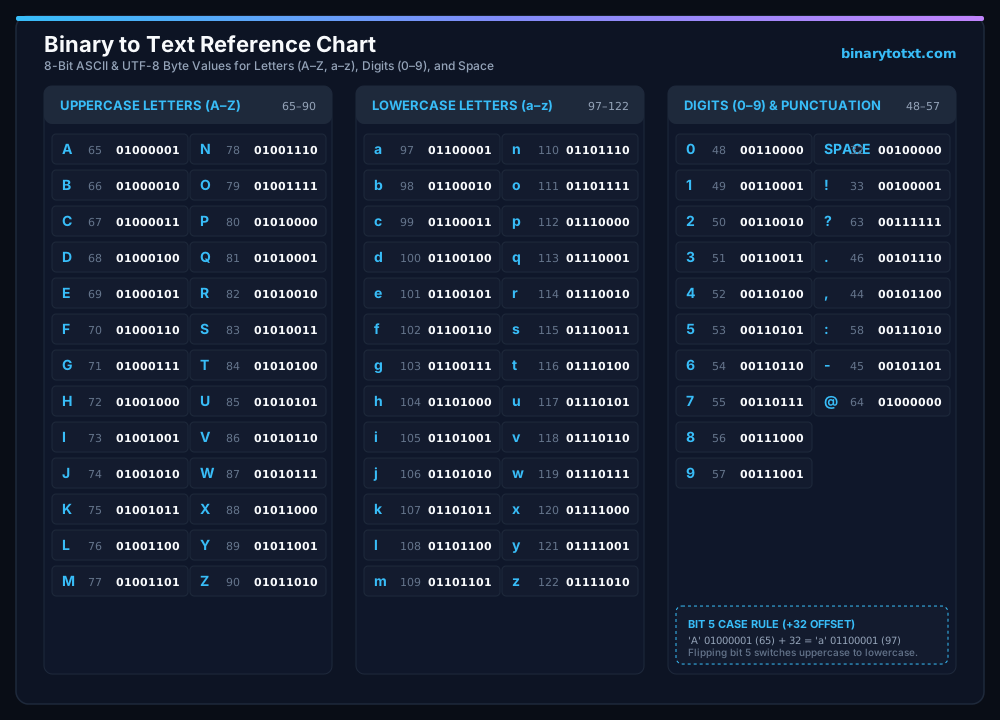

For manual conversion methods and place-value math, study our step-by-step binary conversion guide.
How the alphabet maps to binary numbers
The binary alphabet represents each English letter using an 8-bit byte derived from its ASCII decimal value, running from 65 to 90 for uppercase and 97 to 122 for lowercase. For a full index of numeric codes, see our complete ASCII character codes.
When you type the letter “A”, the computer does not store the shape of the glyph. Instead, it references the ASCII table to find code 65. In base-2 binary math, decimal 65 is represented as 01000001 (64 + 1). As you advance through the alphabet, each subsequent letter simply increments the binary number by one:
- Letter A: Decimal 65 =
01000001 - Letter B: Decimal 66 =
01000010 - Letter C: Decimal 67 =
01000011 - Letter Z: Decimal 90 =
01011010
Uppercase vs lowercase binary differences (Bit 5 rule)
Uppercase and lowercase ASCII letters differ by exactly decimal 32, meaning you can convert between uppercase and lowercase by flipping bit 5 from 0 to 1.
This elegant mathematical relationship was deliberately engineered into ASCII in 1963 to allow hardware teleprinters and early keyboard terminals to switch letter cases with minimal circuit logic:
| Uppercase | Binary (Upper) | Lowercase | Binary (Lower) | Difference |
|---|---|---|---|---|
| A (65) | 01000001 | a (97) | 01100001 | Bit 5 toggled (32) |
| B (66) | 01000010 | b (98) | 01100010 | Bit 5 toggled (32) |
| C (67) | 01000011 | c (99) | 01100011 | Bit 5 toggled (32) |
| Z (90) | 01011010 | z (122) | 01111010 | Bit 5 toggled (32) |
ASCII and UTF-8 single-byte compatibility
All 26 English letters, digits 0 through 9, and standard punctuation marks occupy code points 0 through 127, fitting into exactly one 8-bit byte in both ASCII and UTF-8.
It is important to remember that this single-byte format applies specifically to standard English alphanumeric characters. Characters from non-Latin alphabets (such as Greek, Cyrillic, or Arabic), accented vowels, and emojis do not fit into the standard 7-bit ASCII range. In modern software, those international symbols require multi-byte UTF-8 sequences ranging from two to four bytes each, as detailed in our guide to Unicode and UTF-8 encoding standards.
Encoding full sentences and paragraphs
To encode full words, sentences, or paragraphs into binary code with custom separators or prefixes, use our dedicated text to binary converter.
While this chart provides a fast lookup for individual letter codes, full-sentence translation requires parsing spaces (00100000) and punctuation. You can explore worked phrases in our binary word and phrase examples, or refer to troubleshooting binary errors if you encounter malformed byte sequences.
Frequently asked questions about binary letters
What is the binary code for the letter A?
Uppercase A is 01000001 (decimal 65). Lowercase a is 01100001 (decimal 97).
Why do binary letters start with 01?
In 8-bit binary ASCII, uppercase letters occupy decimal values 65–90, all beginning with 010. Lowercase letters occupy 97–122, all beginning with 011.
How many bits are used for each alphabet letter?
Standard computing architectures store each English alphabet letter in an 8-bit byte (eight binary digits).
What is the binary code for a space between words?
A standard space character has ASCII decimal value 32, represented in 8-bit binary as 00100000.
Related binary tools
- Convert bits back into words with the translate binary into text – Instant browser-based decoder with byte inspection tables.
- Use the dedicated binary to ASCII conversion table – Translate legacy 7-bit and 8-bit numeric codes.
- Explore the complete standard ASCII table – Inspect all 128 characters, including non-printing control codes.